installing an MCE Remote causes Windows to install MCIR 109 keyboard driver.
This causes issues with DOSBOX.
Easiest way to fix it: changing the MCIR 109 keyboard to "HID-Compliant device"
Sunday, May 8, 2011

Friday, May 6, 2011
I wish more apps were portable
PortableApps.com
Even if you're not going to be transporting them around on a USB drive, it's still nicer to install portable apps on your machine because
Even if you're not going to be transporting them around on a USB drive, it's still nicer to install portable apps on your machine because
- no messy install/uninstall and ugly registry messiness
- all settings contained with the app
- easy to backup/restore and transport
Saturday, April 30, 2011
Media codecs
Shark007's codecs 32 bit
(Even on 64 bit windows, there is no need to have a 64 bit player or codecs)
lost all my settings in the reformat, but here are ones that seem to work well enough for the current system:
Shark's
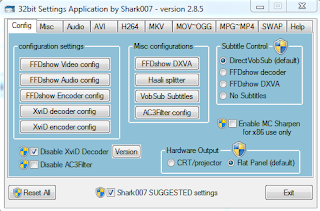


FFDShow Video


(Even on 64 bit windows, there is no need to have a 64 bit player or codecs)
lost all my settings in the reformat, but here are ones that seem to work well enough for the current system:
Shark's
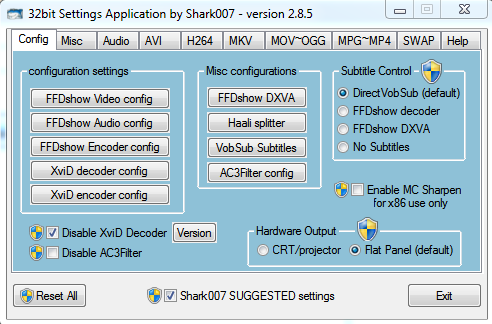


FFDShow Video


FFDShow Audio


AC3 Filter


Friday, April 29, 2011


Friday, April 15, 2011
XBMC: TV Guide Feature
Certain skins like Neon, Night, Simplicity, etc, support TV Guide feature.
To get this to work, you need to install the "TV Show Next Aired" add on found under "Video Addons".
To get this to work, you need to install the "TV Show Next Aired" add on found under "Video Addons".
XBMC Advancedsettings.xml
<advancedsettings>
    <videolibrary>
        <cleanonupdate>true</cleanonupdate>  <!-- default set to false to prevent xbmc from removing items from the database while updating -->
        <hideemptyseries>true</hideemptyseries>  <!-- hide empty series in the video library -->
        <exportautothumbs>true</exportautothumbs>  <!-- export auto-generated thumbs. Defaults to false -->
    </videolibrary>
    <network>
        <cachemembuffersize>0</cachemembuffersize>
    </network>
    <fullscreen>true</fullscreen>
</advancedsettings>
XBMC / Zoomplayer key file
My remote is mapped to send keys as outlined in this post
To map the same keys in Zoomplayer, I use a custom key file:
To map the same keys in Zoomplayer, I use a custom key file:
AddKey(None,37,fnjumpbackward)
AddKey(None,39,fnjumpforward)
AddKey(Ctrl+Shift,66,fnskipbackward)
AddKey(Ctrl+Shift,70,fnskipforward)
AddKey(Ctrl+Shift,80,fnplay)
AddKey(Ctrl+Shift,83,fnexit)
AddKey(Ctrl,80,fnplay)
AddKey(Ctrl+Shift,51,fnarcycle)
AddKey(Ctrl,66,fnslowmotion)
AddKey(None,121,fnvolup)
AddKey(None,120,fnvoldown)
AddKey(Ctrl,70,fnhalfff)
AddKey(Ctrl+Shift,56,fnfastplay)
AddKey(None,119,fnmute)
AddKey(None,38,fnseekforward)
AddKey(None,40,fnseekbackward)
AddKey(None,83,fnexit)
AddKey(Alt+Shift,13,fnfsactmonitor)
nvAddKey(None,13,nvselect)
AddKey(None,33,fnzoomin)
AddKey(None,34,fnzoomout)
AddKey(None,79,fninfonav)
nvAddKey(None,8,nvescape)
AddKey(Ctrl,68,fnbar)
AddKey(None,32,fnplay)
XBMC: External player
I use Zoomplayer as an external player for most of my video viewing.
Zoomplayer provides me with features XBMC is missing:
1. ability to customize decoders/filters to use
2. Fast Play (I watch videos at 1.16x normal speed)
3. audio equalizer (I customize it in zoomplayer, so I don't have to tweak my stereo equalizer)
In order to use external player: XBMC Wiki Reference
Zoomplayer provides me with features XBMC is missing:
1. ability to customize decoders/filters to use
2. Fast Play (I watch videos at 1.16x normal speed)
3. audio equalizer (I customize it in zoomplayer, so I don't have to tweak my stereo equalizer)
In order to use external player: XBMC Wiki Reference
Subscribe to:
Posts (Atom)